
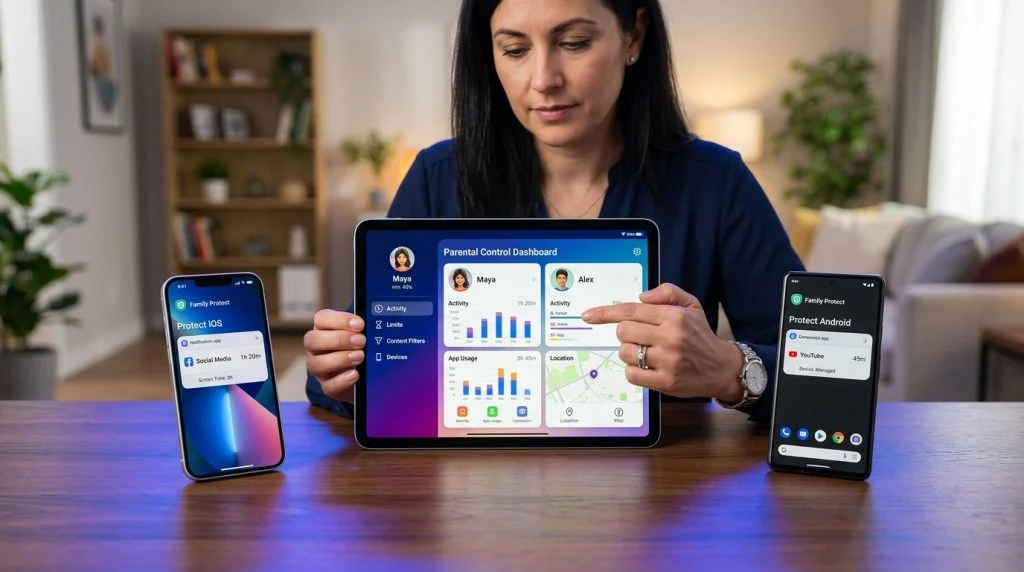
Few modern households run on a single mobile operating system. A teenager might carry a hand-me-down iPhone, their younger sibling plays games on a budget Android tablet, and the parents switch between both platforms depending on their work setup. While this flexibility makes technological and financial sense, it creates an exhausting administrative headache for parents trying to establish a reliable cross-platform parental control framework.
Part of our complete guide: Parental Controls for iPhone & iPad: The Complete Guide
Every platform promises safety out of the box, yet these native solutions were deliberately engineered to serve their own walled gardens. Trying to reconcile separate rule sets, different tracking interfaces, and mismatched screen limits quickly leads to oversight gaps. You end up juggling two different accounts, resetting conflicting screen timers, and hoping nothing slip-ups between the cracks.
Effective digital parenting does not require advanced technical degrees, but it does demand an understanding of how these operating systems interact. By recognizing the intrinsic blind spots of built-in mobile controls and adopting a unified management strategy, you can protect your children consistently across every screen they touch without turning daily technology use into a perpetual battleground.
The Challenge of Managing Mixed iOS and Android Devices
The primary barrier to harmonized digital safety is ecosystem protectionism. When hardware manufacturers build safety tools, their main objective is deepening platform loyalty, not cross-platform interoperability.
Why Native Tools Fail Across Rival Ecosystems
Apple Screen Time is integrated directly into the iOS settings framework. It handles app usage categories, scheduled downtime, and content restrictions smoothly—provided every supervised member uses an Apple ID linked through an iCloud Family Sharing group. The moment you introduce an Android smartphone into the equation, Screen Time becomes entirely blind. You cannot install Screen Time on an Android device, nor can an iPhone parent profile push down web filtering rules to a Google-powered phone.
Conversely, Google Family Link provides a functional parent-facing dashboard on iOS, which allows an iPhone-using parent to supervise a child’s Android phone. However, the system breaks down in reverse. You cannot reliably manage an iPhone using Family Link as the supervised endpoint. Apple does not grant third-party applications the root-level system permissions necessary to terminate active processes, govern device-wide screen timeouts, or monitor application installations natively. As a result, parents dealing with mixed-device homes are forced to maintain two entirely disconnected rulebooks.
Common Blind Spots Parents Face When Managing Multiple Operating Systems
Juggling two distinct native dashboards introduces several practical security vulnerabilities:
- Asymmetrical Web Filtering: Blocking adult content on Safari via iOS settings does not automatically block identical websites on Chrome or secondary web browsers installed on an Android device.
- Inconsistent Screen Allowances: A child granted two hours of recreational screen time can burn through their allotment on an iPad, then simply switch to an Android phone to resume streaming or gaming because the systems do not share session metrics.
- Fragmented Location Data: Monitoring a child’s whereabouts through Apple’s “Find My” while tracking another on Google Maps creates visual fragmentation and delays time-sensitive geofencing alerts.
- Sophisticated Bypasses: Minors quickly discover the platform-specific workarounds. On iOS, children frequently change the device clock or reinstall deleted apps via unmonitored cloud backups; on Android, safe-mode reboots or guest profiles can neutralize basic native restrictions entirely.
Why Cross-Platform Parental Control Matters
A fragmented approach forces parents into an adversarial role, constantly auditing separate interfaces to verify if daily limits or content boundaries are actually working. A true cross-platform framework eliminates these administrative seams, replacing platform-specific workarounds with unified, predictable oversight.
Rather than managing distinct cloud platforms, parents gain a consolidated view of digital behavior via an independent, centralized web dashboard. Whether an activity originates on an iPhone, an Android tablet, or a desktop computer, the incoming metrics are standardized. This centralized setup allows parents to check daily device usage, review location histories, and confirm filter effectiveness from any web browser, on any device they happen to be holding.
More importantly, cross-platform administration ensures equitable, uniform rule enforcement. If the family agreement stipulates that social networking shuts down at 9:00 PM on school nights, that rule should apply indiscriminately across all hardware. When rules are applied consistently regardless of device manufacturer, children spend less time hunting for technical loopholes across alternate screens and more time developing sustainable digital habits.
Organizations like ConnectSafely emphasize that clear boundaries paired with reliable, predictable guardrails significantly reduce online safety incidents among adolescents. A single operational dashboard simplifies this baseline, letting parents spend less time acting as technical administrators and more time having meaningful safety conversations.
Key Operating System Differences: iOS vs. Android Monitoring
Understanding what monitoring tools can realistically achieve requires looking beneath the surface of both major mobile operating systems. Apple and Google approach background services, user permissions, and inter-app communication from fundamentally opposing architectural viewpoints.
How Apple’s Sandboxing Impacts Background Monitoring and Messaging Visibility
Apple designs iOS around a strict security architecture known as application sandboxing. Every app downloaded onto an iPhone executes in an isolated environment, cut off from accessing the files, memory space, or direct network requests of other applications. While this model effectively repels malicious code, it also presents substantial roadblocks for parental oversight software.
On an unmodified iOS device, a monitoring tool cannot quietly observe another running app—such as reviewing chat messages inside third-party apps like WhatsApp or Instagram—because the operating system forbids apps from reading each other’s live inputs. Native parental software must rely primarily on Apple’s restricted Screen Time API, which offers high-level app category times but remains blind to direct keystrokes, incoming communications, or ephemeral media.
Obtaining deep, granular oversight on Apple hardware—such as full text extraction or keylogging—often necessitates advanced configurations or local backup parsing methods. Without these specialized configurations, an iPhone monitoring solution operates within narrower confines than its Android counterpart, focusing primarily on high-level usage metrics, browser logs, and cloud-synced datasets.
Android Permissions, App Installation Tracking, and Deep System Insights
Android is built on a modified Linux kernel that offers substantially higher architectural transparency. While modern versions of Android (especially Android 10 through 14+) have tightened access controls, the platform still provides legitimate background frameworks that monitoring software can utilize with proper user authorization.
Through accessibility services, device administration profiles, and special notification listeners, an Android monitoring application can achieve comprehensive contextual awareness. It can log keystrokes, detect the moment an unapproved application is installed from the Google Play Store or sideloaded as an APK, and capture on-screen text as it renders in real time.
The following table illustrates the structural trade-offs between supervising the two operating platforms:
| Monitoring Feature | Standard iOS (Sandboxed) | Standard Android (Full Permissions) |
|---|---|---|
| Screen Time Category Limits | Native / Excellent | Native / Good |
| Social Media In-App Activity | Restricted without advanced setups | Deep visibility via Accessibility |
| Keystroke & Input Logging | Requires system modifications | Available via accessibility permissions |
| Third-Party Sideload Detection | Not applicable (App Store only) | Full real-time package alerts |
| GPS Location Tracking | Periodic updates via location API | Real-time continuous GPS polling |
Recognizing these technical differences helps parents calibrate their expectations: Android facilitates deep, direct forensic inspection, whereas iOS monitoring often prioritizes structured administrative limits unless advanced device management methods are applied.
Must-Have Features in a Cross-Platform Solution
When selecting a third-party cross-platform parental control platform, feature parity should be your primary concern. If a service tracks social media thoroughly on an Android phone but drops down to vague web filters on an iPad, it fails to solve the multi-device dilemma. Several fundamental capabilities belong on any digital safety shortlist.
Real-Time GPS Tracking and Geofencing Alerts Across All Devices
Accurate location tracking extends beyond merely spotting a coordinate on a map once an hour. Reliable systems update transit coordinates continuously using both cellular triangulation and GPS hardware, mapping the history over time. Geofencing is an indispensable layer: parents should be able to draw virtual boundaries around schools, athletic fields, or a neighborhood home and receive instantaneous push or email alerts the moment the monitored device enters or exits those bounds, whether the child carries an iPhone or an Android handset.
Social Media and Instant Messaging Chat Monitoring
Modern adolescent communication has migrated almost entirely away from traditional SMS and cellular calls into encrypted messaging apps like WhatsApp, Snapchat, Instagram Direct, and TikTok. According to research from the Pew Research Center, a vast majority of teenagers connect primarily through mobile messaging platforms rather than phone calls. A capable monitoring tool must provide insight into these specific pipelines, flagging indicators of cyberbullying, predatory contact, or high-risk peer interactions by logging chat transcripts, timestamps, and contact lists across supported platforms.
Stealth Operation Mode to Prevent Tampering or App Deletion
Curious or rebellious minors routinely share circumvention techniques. Standard retail parental apps are easily spotted on home screens, prompting kids to search for evasion hacks, force-stop background tasks, or delete the management profile outright. A resilient platform should offer an option to run discreetly in the background, omitting conspicuous launcher icons, battery-drain notifications, or task-manager markers that invite tampering.
Setting Up Unified Family Monitoring with SPYERA
Bridging the operational divide between Android and iOS requires dedicated software engineered specifically for cross-platform data collection. Building on over two decades of experience developing specialized device monitoring architecture, SPYERA unifies disparate mobile and desktop environments into a single administrative console, helping parents protect family members from modern digital hazards.
Simple Installation Steps for Both iPhone and Android Targets
Deploying a unified monitoring framework does not require advanced IT expertise, though it does demand brief physical access to the target devices to grant the necessary operating system permissions.
- Set Up Your Central Account: Acquire your license and set up your administrative account on a secure web browser. Choose the subscription model matching the combination of devices in your household.
- Prepare the Android Target:
- Open the target phone and access Settings → Security (or Lock Screen and Security depending on the manufacturer).
- Temporarily disable Google Play Protect within the Play Store settings to prevent generic false-positive alerts on administrative installation tools.
- Download the direct setup client using the unique URL provided in your central welcome documentation.
- Open the installer, grant the requested Accessibility, Battery Optimization, and Usage Access permissions, and enter your activation key.
- Select the stealth-mode option during setup to hide the client icon from the primary launcher.
- Prepare the Apple Target:
- For standard setups, configure the target device to sync automated device backups to a secured local machine or verified cloud environment, or follow the specific direct installation path provided based on the iOS release.
- Ensure background app refresh and relevant location settings are toggled on in Settings → Privacy & Security.
- Complete the activation verification steps as outlined in the central deployment portal.
Accessing Unified Activity Reports Directly from Your Browser
Once deployment is complete on both devices, the administrative phase shifts entirely to the cloud. You log in to your single, centralized web dashboard from any modern web browser—on a desktop computer, a work laptop, or your personal phone.
The dashboard categorizes information cleanly. You can pivot between devices with a single dropdown menu, moving from an Android phone’s incoming WhatsApp transcripts and keystroke logs directly to an iPhone’s route history and call registries. Instead of wrestling with fragmented native platform utilities, you receive automated, cohesive reports covering every device under your care.
A Practical Note on Legal and Ethical Digital Oversight
While monitoring software offers powerful oversight capabilities, it carries serious ethical and legal responsibilities. These tools are designed exclusively for legal guardians supervising minor children under their direct care, or for commercial organizations managing company-owned hardware with documented employee consent. Installing any monitoring software on an adult’s phone—such as a spouse or family member—without their explicit, informed consent is a violation of federal, state, and international privacy laws. Digital safety begins with ethical integrity; whenever appropriate, pair these safety tools with open, honest family discussions about digital boundaries.
How SPYERA Can Help
SPYERA has helped parents and employers with cross-platform parental control since 1999. Monitor calls, messages, locations, and app activity on Android, iPhone, Windows, and Mac — used responsibly, with consent, on devices you own or are authorized to monitor.
Frequently Asked Questions
Can Apple Screen Time monitor an Android phone?
No, Apple Screen Time operates exclusively within the iOS and macOS ecosystems via iCloud Family Sharing. It cannot enforce rules, monitor activity, or set app boundaries on Android hardware. Parents managing mixed ecosystems require a dedicated cross-platform management tool.
How does Google Family Link perform when installed on an iPhone?
Google Family Link offers an iOS parent app to manage supervised Android devices, but it cannot supervise an iPhone. Apple does not allow third-party services the deep kernel-level privileges required to set system-wide app locks or track usage statistics natively across iOS.
Will my child know that monitoring software is installed on their phone?
That depends entirely on how the software is deployed. Open native tools display clear persistent notifications and system badges, while advanced utilities can operate discreetly in the background to prevent intentional bypassing or tampering by tech-savvy minors.
Is it legal to install monitoring software on my child’s device without telling them?
In most jurisdictions, legal guardians have the right to monitor the digital activity of minor children on devices owned by the parents. However, digital safety experts strongly encourage open communication regarding safety guidelines, and monitoring adults without informed written consent is strictly illegal.